Early prototype. Not for sale yet.
Handle project changes, client approvals and payment adjustments in one clear workflow.
For web design agencies, branding studios, creative agencies and freelance designers. When a client asks for more (or less) after the deal is agreed, a change desk prices each change, gets a decision on every line and shows the updated payment schedule.
Fictional project data. Nothing is sent, signed, charged or saved. “Project Change Desk” is a working title, not a final brand.
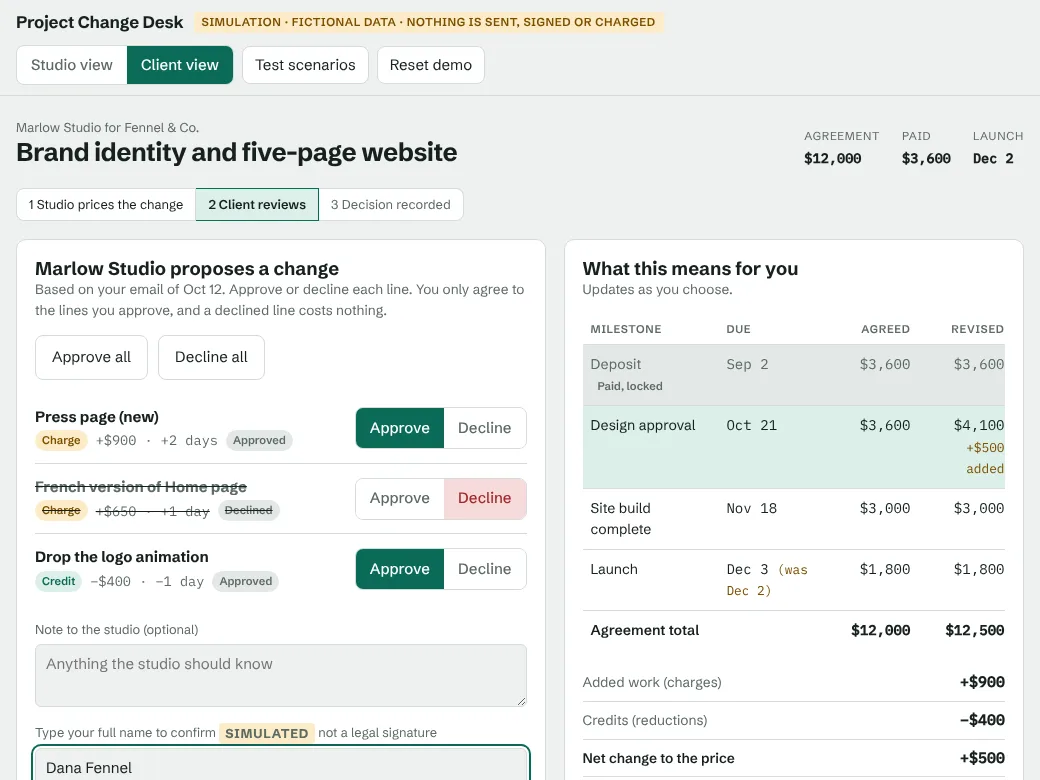
| Milestone | Due | Amount |
|---|---|---|
| Deposit Paid, locked | Sep 2 | $3,600 |
| Design approval | Oct 21 | $3,600$4,100 |
| Site build complete | Nov 18 | $3,000 |
| Launch | Dec 2Dec 3 | $1,800 |
| Agreement total | $12,000$12,500 | |
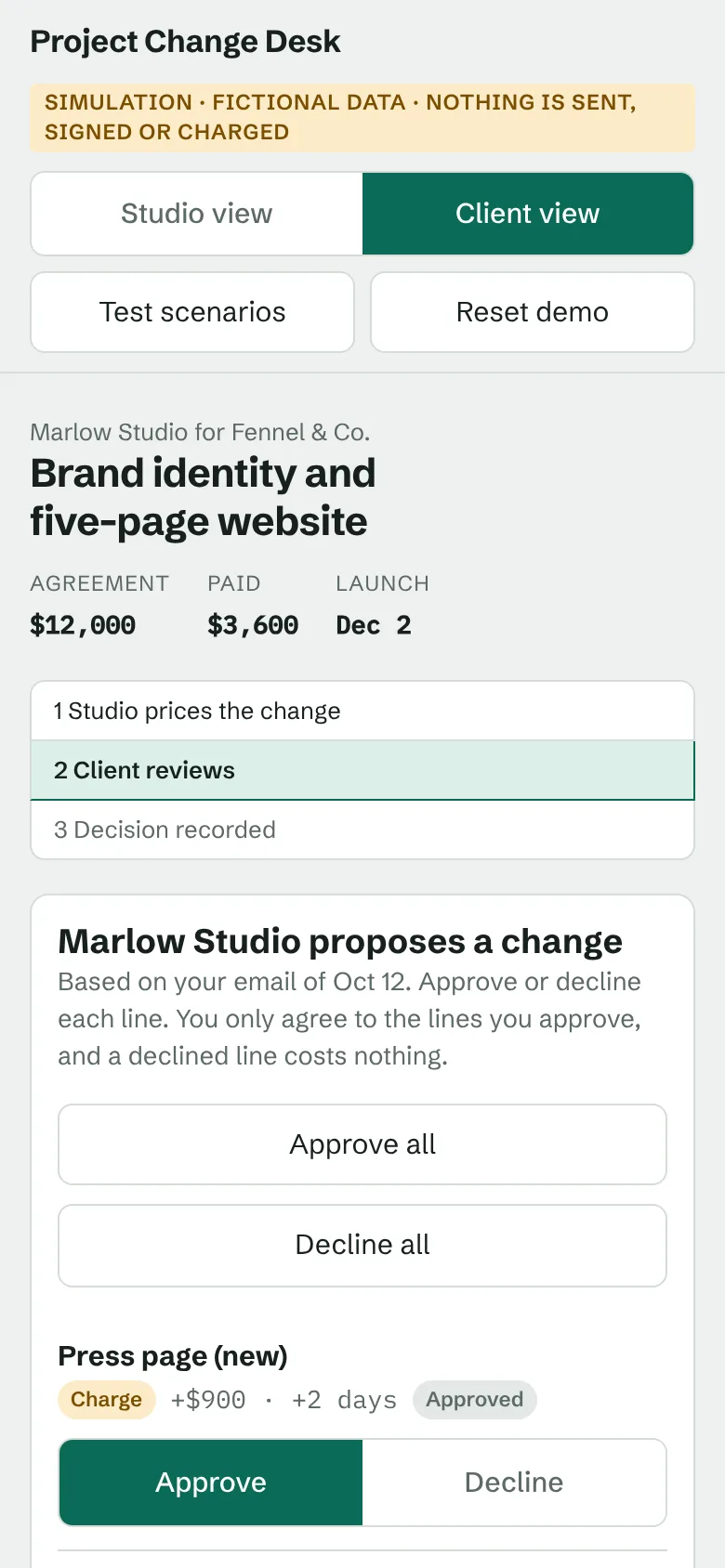
- Press page+$900, +2 daysApprovedRequested
- French version of Home page+$650, +1 dayDeclinedRequested
- Drop the logo animation−$400, −1 dayApprovedRequested
The client approved two lines and declined one. The declined line costs nothing and moves nothing.
The agreed schedule before any change. Paid milestones are locked and never change.
Approved scope doesn’t stay approved.
The proposal is signed, the deposit is paid, and then the client writes back. One email can add pages, drop deliverables and shift the launch date.
Now the project no longer matches the agreement. Nobody is sure which requests are in, what each one costs, or which invoice should change. The follow-up emails, the revised quote and the arguments about what was agreed all happen in different places.
- Scope Which of the requests are actually part of the project now?
- Price What does each change cost, and what is credited for work that is dropped?
- Payments Which invoice moves, and does the launch date move with it?
Can we add a Press page? And a French version of the Home page. Also, we won’t need the logo animation any more.
Three requests, two charges, one credit, and two dates that may move.
How Project Change Desk works
Four steps, in this order, from the client’s email to an updated schedule.
-
Create a change request
Split the client’s email into separate lines: one line per change, instead of one lump the client has to accept or reject whole.
-
Price additions or credits
Give each line a charge or a credit and the days it moves. Choose how it reaches the schedule: on the next invoice, spread across unpaid invoices, or as its own invoice.
-
Get the client’s decision
The client approves or declines every line. Partial approval is normal, and the schedule recalculates as they choose.
-
Review the updated schedule
See the new agreement total, the next payment and the launch date, with a written summary of exactly what was approved and declined.
What the prototype does
Everything below works in the interactive demo, with fictional data.
- Itemised approvals
- Each requested change is approved or declined on its own. A declined line costs nothing and moves no dates.
- Payment milestones
- Paid milestones are locked. Unpaid ones change by the billing rule you choose, and the schedule updates as you edit.
- Credit handling
- A credit lowers upcoming invoices and never takes one below $0. Whatever is left carries to the next invoice.
- Clear change summaries
- A plain-language record of what was approved, what was declined, the new total, the next payment and the launch date.
- Mobile-friendly client review
- The client’s review screen is built to be read and decided on a phone as well as a desktop.
- Refund authorisation
- If a client’s choices could ever mean paying back money already paid, the studio sees the largest possible amount and sets a limit before sending. Anything above it is blocked.
Why refund authorisation matters
Say a client asks to cancel the website build (a $9,000 credit) and to add a printed guidelines book (a $5,000 charge). Only $8,400 is still unpaid. If the client approves only the credit, $600 of money they already paid would have to go back, even though the studio never agreed to that.
The prototype checks all four ways the client could decide, shows the studio the $600 before it sends, and blocks that outcome unless the studio authorised it.
| Client approves | Refund |
|---|---|
| Both lines | None |
| The $9,000 credit only | $600 needs authorisation |
| The $5,000 charge only | None |
| Neither line | None |
Try it yourself in two minutes
The demo is the working prototype. Play the studio, send a change, then switch to the client and decide on each line.
- Price a change and watch the payment schedule update
- Approve two lines and decline one
- Try a credit that is bigger than the next invoice
- Cancel most of a project and see what happens to money already paid
- Load a ready-made scenario from Test scenarios
Interactive demonstration. Fictional information. No real emails, approvals or payments are processed. Nothing is saved, and reloading the page resets it.
Early access: we’re testing, not selling
Project Change Desk is a working prototype, and we want to know whether it fits how agencies and freelancers actually handle changes. There are no accounts, no subscriptions and no paying customers. Nothing is for sale yet.
If you run a design, branding or creative business, a few honest minutes are the most useful thing you can give us. Tell us what you use today, where the demo confused you, and whether you’d be willing to test it.
The form is hosted by Tally (tally.so), a third-party service, and is only loaded if you choose to open it. What you submit is handled under Tally’s own privacy policy. This site itself sets no cookies and runs no analytics scripts.
Request early access or give feedback
A short form. It asks for:
- Your business email
- Your type of business and country
- The project or proposal software you use now
- Roughly what you spend on software each month (optional)
- Your biggest frustration with project changes
- Whether you’d like to test it, and whether you’d consider a paid pilot
- Permission to contact you about testing
Please don’t enter client names, invoices, bank or card details, or any other real financial records. We don’t need them.
The early-access form isn’t open yet. This section will show it as soon as it is ready. In the meantime, try the demo and note anything that confuses you.
When it opens, the form will ask for:
- Your business email
- Your type of business and country
- The project or proposal software you use now
- Roughly what you spend on software each month (optional)
- Your biggest frustration with project changes
- Whether you’d like to test it, and whether you’d consider a paid pilot
- Permission to contact you about testing
It will not ask for client details, invoices or any financial records.
Questions and honest answers
What is Project Change Desk?
A prototype of a workflow for project-based businesses (“Project Change Desk” is a working title that describes what it does): when a client asks for changes after an agreement, the studio prices each change, the client approves or declines each line, and the payment schedule updates. It is not a released product.
Is that the final name?
No. “Project Change Desk” is a descriptive working title for this demonstration. A final product name has not been chosen and has not been legally cleared. Please don’t treat the name as a brand, and expect it to change.
What does the prototype do?
In the demo you can open the Studio view, change pricing, add and remove lines, choose charges or credits, pick how they hit the payment schedule, and preview the result. You can send a simulated change request, switch to the Client view, approve or decline individual lines, review partial approvals, see the revised agreement totals, explore refund-authorisation scenarios and reset the demo.
What is simulated?
Almost everything outside the calculations. No email is sent. A typed name is not a legal signature. No payment is taken, no invoice is created and no refund is paid. The project, the people and the amounts are made up. Nothing is saved, and reloading the page resets the demo.
What isn’t available yet?
Accounts and saved projects. Sending real emails or links to clients. Legally valid e-signatures. Creating invoices, taking payments or issuing refunds. Connections to accounting or payment tools. Tax handling and currencies other than USD. Team members and permissions. Subscriptions. None of these exist today, and we haven’t set a price.
Can I use real client details in the demo?
Please don’t. Use the made-up data it starts with, or invent your own. The demo page contains no code that sends data anywhere or stores it, but it is a demonstration, not production software.
Can I rely on the calculations for real invoices?
No. The billing calculations have been tested in this prototype, but Project Change Desk is not accounting software and does not give financial or legal advice. Check any real invoice or contract yourself.
Who is it for?
Web design agencies, branding studios, creative agencies, freelance designers and other small project-based service businesses that bill in stages and handle mid-project changes.
How do I give feedback or ask about a pilot?
Use the short form in Early access. We are looking for businesses willing to test the workflow and tell us what doesn’t work. The form never asks for financial records.